


Open Balkan
You can activate your ENPay TAG on the OPEN BALKAN platform.
North Macedonia, Montenegro and Croatia are already active, and soon there will be more destinations from the region.
Activation is quick and easy!
Dear,
At the following link, you can access the Open Balkan portal and link your payment card:
https://toll4all.com/tag-registracija
- Enter all required information
- After clicking the “continue to payment” button, you MUST CANCEL adding a payment card for Serbia (The payment card for Serbia is already registered in the EnPay application)
- You will automatically receive login credentials at the email address you entered
- Log in to your Toll4All account using those credentials
- In the CARDS section, select a foreign country and add your payment card
If you are unable to successfully complete the registration, please contact customer support at podrska@enpay.rs
so we can send you the correct parameters for registration.
Currently, only North Macedonia, Croatia and Montenegro are activated, and soon other countries from the region will also be activated – you will need to link your card additionally for each country.
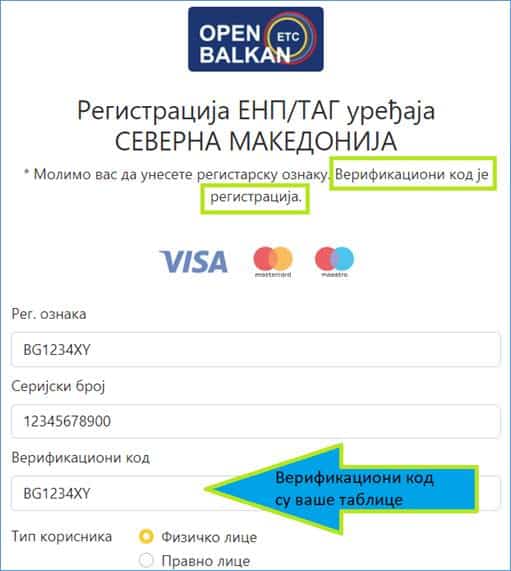
Please use the license plates that are already in your system when entering vehicle registration numbers / plates. It doesn’t matter if you have changed your vehicle, plates, etc., in the meantime – enter the plates that are already registered on your TAG.
You can enter both domestic and foreign vehicle registration numbers, omitting special characters – for example, Š=S, Ć=C, Ž=Z, etc. For instance, ČA=CA, VŠ=VS, KŠ=KS, PŽ=PZ, etc.
The toll charges for passings are debited from your card directly the day after passing through the toll booth.
The toll charges for passings are debited from your card directly the day after passing through the toll booth.